
Projects and Agents
Tycho configuration lives under ~/.tycho by default.
| Purpose | Default |
|---|---|
| Project registry | ~/.tycho/config/hq.yml |
| System prompts | ~/.tycho/config/system_prompts.yml |
| Response style policy | ~/.tycho/config/response_style.md |
| Schedules | ~/.tycho/config/schedules.yml |
| Runtime state and logs | ~/.tycho/logs/ |
| Delegation ledger | ~/.tycho/logs/agent_delegations.json |
| Normalized usage metrics | ~/.tycho/logs/usage_metrics.json |
| Remote credentials | ~/.tycho/config/remote_credentials.json |
| Server identity | ~/.tycho/config/server_identity.json |
Project Registry
Section titled “Project Registry”Minimal project config:
projects: - key: my-workspace name: My Workspace group: Personal path: /Users/you/Code/my-workspace agent: codexThe agent field is the default harness. You can override it per session:
tycho agent create my-workspace "Try the alternate implementation" --harness claude --runTo choose the project that Quick Agent selects by default, set quick_agent.default_project_key in hq.yml. A blank value keeps the first available project. You can also set it in Remote UI under Settings > Configuration.
Tycho includes Codex, Claude, OpenCode, and Pi harnesses. See Harnesses for prerequisites, executable overrides, safety differences, and compatible custom harness profiles.
The local tycho harness list command reads model and reasoning suggestions from fallback or configured catalogs. It is offline by default. See Harness Catalogs for exact filters, discovery, and evidence limits.
Inspect a Project Workspace
Section titled “Inspect a Project Workspace”Remote UI exposes a Files view for every registered project, including projects owned by configured peers. Search the registered workspace, preview Markdown and images safely, and make guarded plain-text edits on desktop where editing is available. Existing workspaces remain read-only on mobile. Directory and selected-file state stays in browser history, so Back and Forward return to the expected location.
The server accepts relative paths only and resolves them against the registered project root. It rejects traversal and paths that escape through symlinks, hides VCS and generated directories, filters secret-shaped names and content, and refuses binary or oversized previews. Listings are paginated and bounded. The browser never receives an arbitrary host path and cannot use this view to register a new project.
The browser cannot register an arbitrary host directory. Use the TUI or CLI for project registration. The Files boundary protects browsing and guarded editing; it does not restrict a launched harness.
Configure a Remote Server
Section titled “Configure a Remote Server”Add a stable peer key to ~/.tycho/config/hq.yml:
remote_servers: - key: vps name: VPS icon: server url: https://tycho.example.net token_env: TYCHO_VPS_REMOTE_TOKENRemote UI combines server-qualified projects and agent sessions but routes every operation to its owner. The CLI uses the same registry with --server vps. Schedule editing, setup, push notifications, skills, and the Settings restart action apply to the server that serves the UI. A configured online peer can expose an Update action when it reports a Homebrew install. The confirmation states that its running Remote UI and scheduler will restart; source-installed, offline, and older peers do not expose that action.
Prefer Tycho’s credential store over an inline token:
tycho server login vpstycho server verify vpstycho server status vpslogin uses a hidden prompt. Verified credentials bind to the stable server key and normalized origin. Changing the scheme, host, or effective port requires verification or a new login. token_env takes precedence when configured; if that variable is absent, the request fails rather than falling through to another credential source. Inline token values still work with a migration warning; move them into the private store with tycho server migrate <server-key> or tycho server migrate --all. See CLI Reference.
Review Agent Output in Remote UI
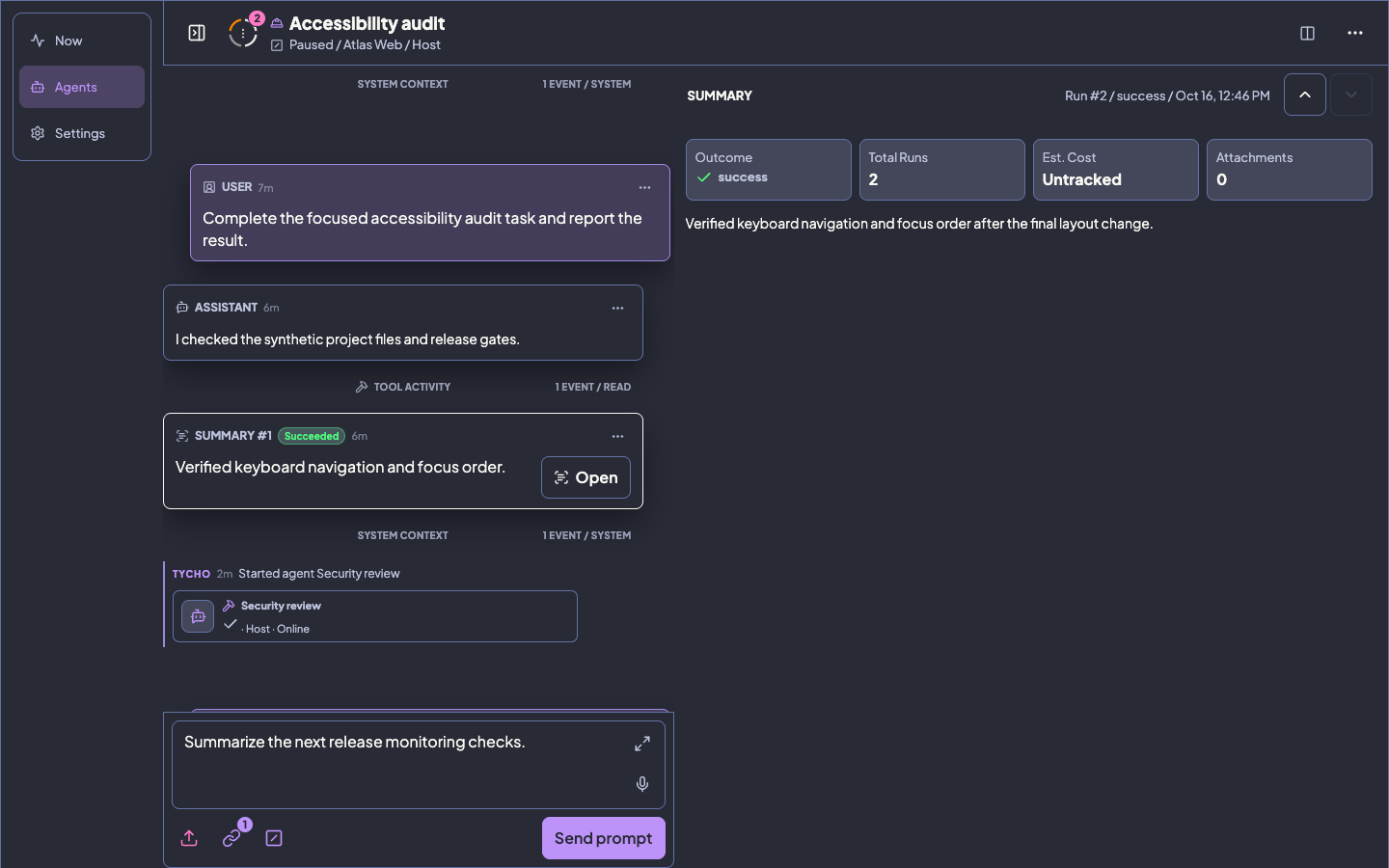
Section titled “Review Agent Output in Remote UI”Run summaries are durable conversation entries. Open a summary to move to the previous or next run and inspect its attachments; file attachments offer a direct authenticated download beside the detail view. Downloads keep a validated safe form of the original filename. Each uploaded file and workspace image preview can be up to 20 MB; a message can include up to five files with a 25 MB total limit.
On wide screens, select a Summary attachment to open its safe preview in a third column with independent scrolling and keyboard focus. Smaller screens keep their normal workspace navigation. Known errors can be inspected in Summary details while the recorded result stays intact. Safe Markdown frontmatter is shown as metadata, nested lists keep their structure, and HTML remains sanitized.
A missing or invalid structured result still gets a Summary card. Only the detail view can show bounded, redacted fallback assistant context. This does not turn an invalid result into success.
Attach or detach a pull request from the session’s PR diff catalog through Remote UI or tycho agent pr-diff add and remove. Detaching preserves source attachments and shared immutable snapshots.
For an agent-owned pull request, open its saved diff, select exact added, removed, or context lines, write a comment, and choose Add section. Tycho attaches bounded context from that immutable snapshot to the same agent composer. If the pull request changes, refresh and select again; stale selections are rejected instead of being applied to a different diff.
Where browser speech recognition is available, the composer can start speech mode with Cmd+Shift+. on macOS or Ctrl+Shift+. on Windows and Linux. The shortcut only acts when an eligible conversation composer is visible.
Response Style
Section titled “Response Style”Tycho appends ~/.tycho/config/response_style.md to cold and resumed agent prompts by default.
Set a project-level response_style to replace it, or set response_style: false to disable it for that project.
Runtime Overrides
Section titled “Runtime Overrides”Use TYCHO_ environment variables when you need a temporary profile or test run:
| Variable | Purpose |
|---|---|
TYCHO_HOME |
Override the default ~/.tycho root. |
TYCHO_CONFIG_PATH |
Override the project registry path. |
TYCHO_LOGS_ROOT |
Override runtime state and logs. |
TYCHO_CODEX_BIN |
Override Codex executable lookup. |
TYCHO_CLAUDE_BIN |
Override Claude executable lookup. |
TYCHO_OPENCODE_BIN |
Override OpenCode executable lookup. |
TYCHO_PI_BIN |
Override Pi Coding Agent executable lookup. |
TYCHO_SKILLS_HOME |
Override the home prefix used for isolated harness-skill profiles. |
TYCHO_STRUCTURED_OUTPUT_CORRECTION_LIMIT |
Set structured-output correction attempts from 0 to 5; the default is 2. |
Keep secrets, real config files, and generated agent artifacts out of committed repos.
See Harnesses for how validation and bounded same-session correction behave.